Download GCAM 8.7 for all Android devices with new camera features like Cinematic Blur, Magic Eraser and Real Tone.
This year’s “Made by Google 22” annual event featured a range of products including smartphones, tablets, Google Home and more. The main attraction of the event is the launch of two new flagship smartphones from Google. Pixel 7 and Pixel 7 Pro, The new Pixels feature a custom Google Tensor G2 chipset supported by Android 13 and updated Google apps. We’re particularly impressed with the performance of the Pixel 7 Pro camera app. Here, download newest GCAM 8.7 APK From Pixel 7 and 7 Pro devices.
Apart from the phone, Google also launched a new Pixel Watch. The firm also released a range of Google apps and updated several others with support for Wear OS. The latest Google Camera v8.7 also supports Wear OS.
Here are all the features and changes in the Google Camera 8.7 app.
Google Camera 8.7 Features (GCAM 8.7)
- The Quick Settings button at the top now has corresponding icons for each capture mode.
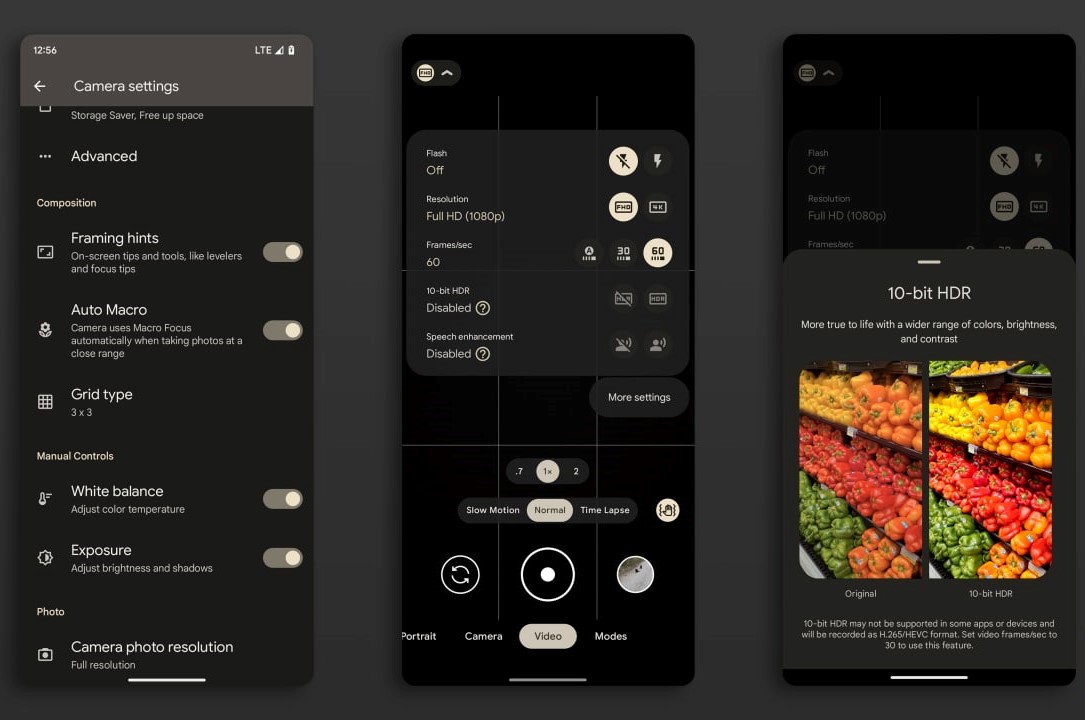
- For video, the quick settings show the current quality and indicate whether “speech enhancement” is enabled.
- The Motion Mode shutter icon has been replaced for Pixel 6 and above.
- Added “Mode” tab opening animation that was missing in previous version.
- Added “Frequent Faces” feature which was disabled some time back.
Changes in Pixel 7 and 7 Pro:
- Updated zoom slider interface.
- The updated Night Sight now allows you to choose the shooting interval from 3 to 6 seconds. (Also applies to Automatic Night Sight in camera mode)
- Added new “Cinematic” mode.
- Added 10-bit-HDR switch to Quick Settings in Video mode.
- Added an “Auto Macro” switch to Settings for the Pixel 7 Pro.
Google Camera 8.7 Camera App Screenshots:


GCAM 8.7 now fully supports Android 13’s Material Design. It can now automatically apply accent colors based on the home screen wallpaper you’ve set and lets you choose a color from a color palette. on the phone. Thanks to the dynamic wallpaper theme engine.
Here’s the latest GCAM v8.7 that comes straight from the Pixel 7 and supports the latest Android 13, 12, 11, or older OS versions. The app also supports Pixel Watch. (Wear OS)
Includes 3 new Core Pixel camera features as listed above Magic Eraser, Real Tone and Cinematic Blur, Since GCAM 8.7 MOD BY BSG is fairly new, not all of these features may be included. You will have to wait for the integration of all these new features in the upcoming builds.
We also posted latest pixel 7 feather wallpapers and curated culture and community wallpapers for all smartphones. You can also get latest ringtones by using Google Sounds APK.
Plus, start tuning in for the upcoming google camera 9.0 Which will be released soon. In the meantime, download the first GCAM 8.7 APK by developer BSG.
GCam 8.7 APK Download
Here is the first Google Camera 8.7 MOD for all Android devices by the developer BSG. Download GCAM 8.7.165 APK below with features like Auto Night Sight and Activate HDRnet. Added “Maximum” item to “Photo resolution” menu.
GCAM 8.7 supports all Android devices running Android 11, 12 and 13. It can work on Pixel and non-Pixel devices.
download apk
- telegram channel download link
full download repository
Stable Gcam MODs For All Android Devices
Below we have listed the latest Gcam 8.4 mod apk from various developers Stark, Arnova, Parrot, BSG, Arnix Which will be available in the coming days. It may not be available yet as development takes time.
In the meantime, you can download the Latest GCam 8.3 or the more stable GCam 8.2.400 Modified APK and install it on any Android device. You can also install it on Android 12, 11, 10 or earlier versions like 9.0 Pie.
Join our Telegram Channel.