

The development of Android Auto never stops. From beta we went to stable and from stable we went to beta. Android Auto 8.8 stable was official last week and we already have a new beta: Android Auto 8.9 beta is now available for download.
If you are part of the Android Auto beta program -something that is not easy since it has been full for years- then the update will arrive comfortably from Google Play. Otherwise, you will always have to download the APK, as usual.
Android Auto 8.9 beta is here
The last time Google released a beta version of Android Auto was on January 24 with the release of Android Auto 8.8 beta. Two weeks later, we have a new beta: Android Auto 8.9 beta is already a reality.
Android Auto reaches version 8.9 Beta, although do not expect radical changes. The Coolwalk redesign continues to progress nicely by bringing the new multi-window functionalities to the car, and Google continues to polish some of the Android Auto bugs and issues in each update. That is, mostly internal changes.
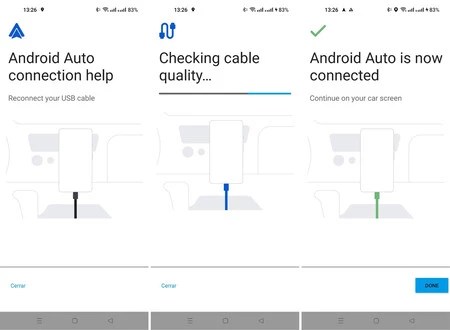
We have tested Android Auto 8.9 Beta in search of new features and, as usual, we have not found anything radical. The only novelty that we have discovered is that the redesign of Material You of the mobile app It also applies to the wired connectivity help wizard, which was added in Android Auto 7.5 and now looks prettier than ever.
Of course, the redesign of Android Auto with Material You is still in progress and is not generally active for all users. If you want to try your luck, nothing prevents you download and install Android Auto 8.9 Beta right now, whether or not you are part of the beta program. This is what you have to do:
- Download the Android Auto 8.9 Beta APK from APKMirror.
- Open the file on mobile and you will be asked if you want to install it as an update.
- After installing the new version, please reconnect the mobile to the car to use the new version.


