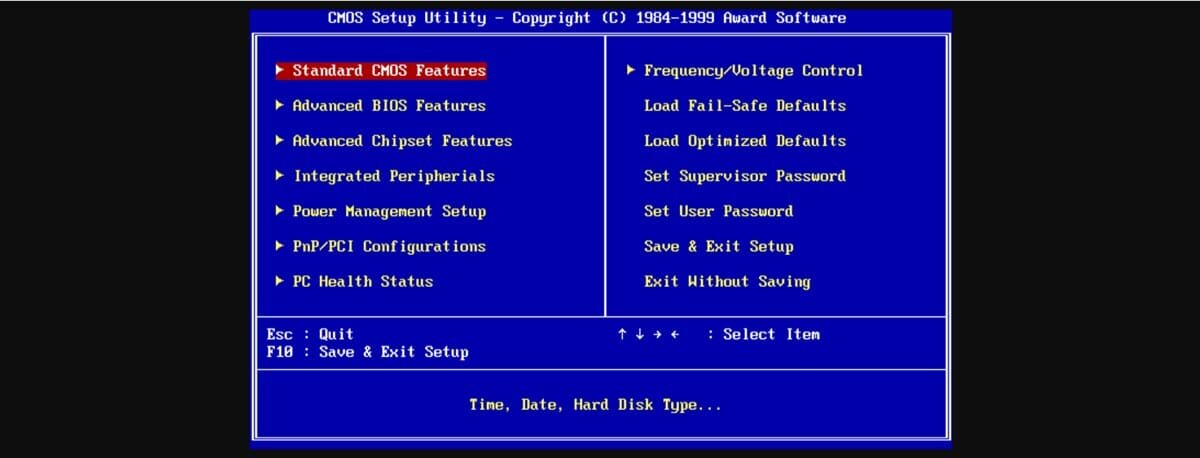
Computers have gone through a process of evolution that has led them to be increasingly accessible and understandable to users. However, there are aspects that seem to remain in the hands of experts in the field, due to their degree of complexity. Although this is true in any field, In computing it is possible to speak in simpler terms to understand many things. For this reason, today we want to do it in order to explain what the BIOS is in a computer and what it is for.
If you have searched how to install an operating system or more complex processes such as Overclocking, you may have come across the concept of BIOS. In that sense, although it seems a somewhat complicated topic, we are going to tell you everything about it, in the simplest way.
What is Bios?
BIOS is the acronym for Basic Input/Outpout System, that is, Basic Input and Output System. It is a chip incorporated into the motherboard that contains a firmware in charge of executing a series of processes aimed at managing the computer’s startup, activating services such as processor temperature monitoring, checking connected hardware, and more.
In this way, it is a combination of hardware and software with the purpose of validating that the computer meets the minimum standards to cede control to the operating system. This is why unplugging the RAM for example will cause the computer to fail the BIOS check.
BIOS history
The term BIOS was coined in 1975 with the arrival of the CP/M operating system by the computer scientist Gary Kidall.. Kidall defined as BIOS the section of his system that was in charge of starting the equipment and interacting with the hardware, validating that everything is correct.
Later operating systems also had a module for these purposes. However, little by little it began to be left in the hands of the chip that incorporated the motherboard. In this way, the BIOS became the first security barrier for the boot of a computer, preventing its activation if a core component is missing.
What are the functions of the BIOS?
Being clear about what the BIOS is and how it became part of personal computers, it is worth knowing its functions. In that sense, We can say that the tasks of this element can be divided into 3 large groups: boot management, hardware check and service activation.
Below we will tell you what each of these aspects is about and how they are managed by the BIOS.
boot management
Boot management is based on the provision of everything necessary to cede control of the computer to an operating system.. In that sense, there are different ways to achieve this: hard drives, CDs, USB memories and even the network. In this case, the BIOS is in charge of automating this decision based on a previous configuration, where we define the priority order of these boot sources.
hardware check
Hardware checking is another area where BIOS functions move. It is a mechanism whose purpose is to validate that all the hardware on which the computer depends to function is correctly connected and working. We have a clear example of this in the notification of old computers when turned on and not having a keyboard connected.
In this way, if the RAM memory is missing or fails or in the absence of a hard disk, the BIOS will throw an alert at the end of the verification. Also, in many of these cases, it will not allow the operating system to start.
Activation of services
Different brands of motherboards have a variety of options that complement the administration and management of components. In that sense, we can find boards with power management options, temperature and speed monitoring, and more. All this is activated directly from the BIOS, when the computer boots.
In this way, the BIOS is also in charge of executing all the complementary utilities that the motherboard and firmware integrates.
Administration and management
Although we did not mention it before, we must highlight the facet of administration and management offered by the BIOS. By accessing it, we have the possibility of working with its management functions, such as Overclocking.. Likewise, you can configure the boot order in order to define that it always starts with the USB ports, if you need it.
This aspect of the Basic Entry and Exit System is very relevant because it will allow you to access controls and advanced information about the system. To enter, you will have to access the manufacturer’s page in order to know the keys or key combination that leads to its interface.