
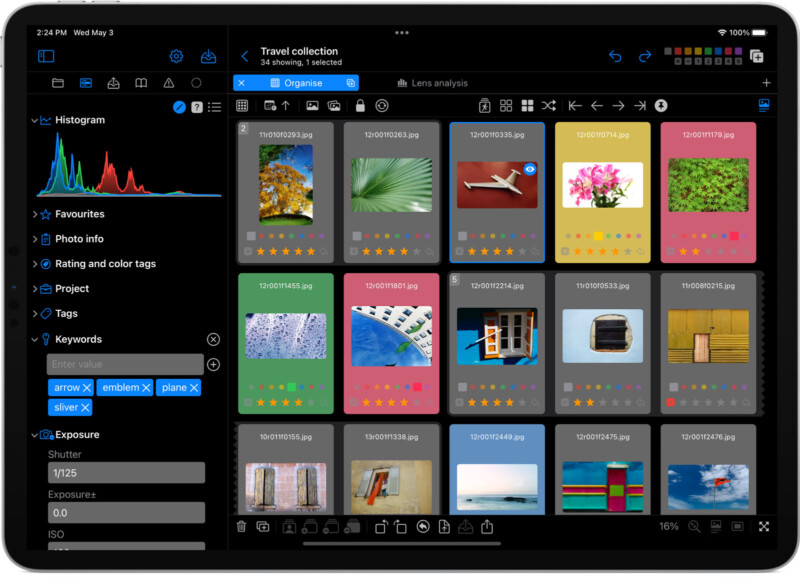
PhotoOrganista is an app designed to help photographers manage large photo portfolios. Developed by Bristol Bay Code Factory, PhotoOrganista works with over 650 image formats, including RAW images from most major cameras.
Available for MacOS and iPadOS, PhotoOrganista allows photographers to organize and view their portfolios on Mac computers and iPad tablets.
 An accompanying iPad app allows users to view and sort photo portfolios.
On the desktop version, users can point their images to a source folder to the app or “sit back and let PhotoOrganista do the archiving,” which will save the images to the app’s portfolio or to the user’s connected iCloud storage. The portfolio can be viewed on the iPad using a special connected app.
 Similar images and images for projects can be stacked with a drag-and-drop interface.
The key features of PhotoOrganista are Organize, Search & Explore, and View & Update. For organization, users can create stacks of photos using drag-and-drop, rate and color tag images with shortcuts, and assign projects and add user tags, which can be organized hierarchically .
To find and explore the archive, the app provides powerful search tools that use any combination of projects, tags, filters, “quickpicks”, snap filters, and text search. Users can construct any search term using various metadata properties.
 The app promises powerful and customizable filtering tools.
Talking about metadata, it comes under the “view and update” feature. Users can access over 85 photo assets, and the app includes metadata editing tools that enable bulk metadata editing. In particular, the original file metadata can be preserved. For photographers using analog cameras, the app also has dedicated entries designed to help photographers label and identify “metadata” for film scans.
 For film photographers, PhotoOrganista includes dedicated “metadata” fields for analog photography.
For photographers looking to learn about their most-used lenses, preferred apertures, go-to shutter speeds, or other trends, PhotoOrganista includes visualization tools, including bar charts and pivot tables, with similar metadata group images together and help photographers study shooting patterns.
 PhotoOrganista provides analysis of user’s images including metadata pattern breakdown.
The functionality is similar, though less comprehensive, than Bristol Bay Code Factory’s other Mac app, PhotoStatistica, an app that lets photographers check full EXIF data in bulk.
 The app offers view and compare functionality.
PhotoOrganista promises a variety of customization and personalization options, including a changeable color and layout, adjustable keyboard shortcuts, custom “QuickPick” menus, and more. The custom “QuickPic” menu allows users to filter selected specific images based on specified tags.

Additional features include full-screen viewing, an image comparison tool using reference images, and the ability to zoom in on photos up to 3,200 percent.

Bristol Bay Code Factory describes its app as a “fast, flexible and affordable digital asset manager”. PhotoOrganista is available on the App Store for $14.99 and both the Mac and iPad versions are included in the in app purchase.
Image Credits: Photoorganista by Bristol Bay Code Factory


