
Along with the requirements, here’s how the process actually works (via WhatsApp). First, you need to install the official Move to iOS app from the Play Store. Once the app is installed on your Android phone and your iPhone is ready in a clean state (new or factory reset), follow these steps:
1. Launch the Move to iOS app on your Android phone and follow the on-screen prompts until you reach the page that says Find Your Code.
apple/youtube
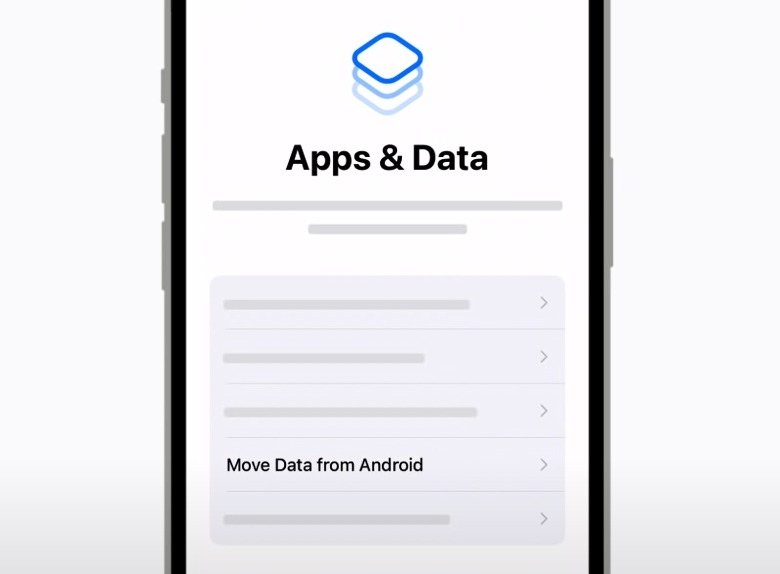
2. On your iPhone, proceed with the device setup process until you reach the Apps & data page. On this page, tap on the option that says Move data from Android.
3. After selecting the Move data from Android option on your iPhone, you will see a code that you need to enter on your Android phone.
 apple/youtube
4. Once the code is entered and the two devices are paired, you will be taken to the Transfer data screen on the Android phone. Here, select WhatsApp, among other apps and data you want to transfer.
5. After selecting all the data you want to transfer, press the blue continue button to start the data migration process.
 apple/youtube
6. Once the transfer is finished, you will see the transfer complete screen on your iPhone. Hit the Continue setting up iPhone button to finish the process and get your iPhone ready.
7. When setup is over and the home screen appears for the first time, you will see a prompt asking you to download the iOS versions of the apps that were installed on your Android phone, including WhatsApp. Alternatively, you can dismiss it, go to the App Store, and download the latest version of WhatsApp on your iPhone.
8. Once the messaging app is installed, log in using the same phone number it was associated with on the Android phone.
9. After handling the login process through OTP system, press the START button. The app will automatically unpack all the data transferred and show it in the right places including your WhatsApp chat history from the Android device.
This process involves encrypting the data before moving it from Android to iPhone, which means no one else will be able to use this method and gain access to your WhatsApp chat history. Of course, if you ever want to go back from iPhone to Android, you can also follow some simple steps to back up your WhatsApp data on the Android platform.


