

Amazon の Fire TV Stick デバイスは、テレビのスマート TV 機能を拡張する優れた代替手段です。 彼らと一緒に、 私たちはテレビにまったく異なるオペレーティングシステムを提供しますあらゆる種類のアプリをダウンロードしたり、モバイルからコンテンツを送信したり、Netflix、Prime Video、Disney +、会社などのプラットフォームから映画やシリーズを再生したりできます。
ただし、それらは完璧なデバイスではなく、アップデートで簡単に修正できるいくつかの制限がありますが、まだ存在しています. そのうちの XNUMX つは、テレビがアイドル状態になったときに Fire TV を「スリープ」モードにするオプションを無効にできないという事実です。 それにもかかわらず、 それを実行できるようにするためのちょっとしたトリックがあり、Fire TV を常に起動しておくことができます.
スリープ モードを無効にする理由と要件
Fire TV Stick を常にオンにしておくことを好む特定の種類の状況があります。 Plex や Kodi などのアプリケーションを使用している場合、または単にデバイスをいつでも使用できるようにしたい場合は、テレビを使用しない状態が数分続くと、スリープ モードが煩わしい場合があります。 アイドル状態のまま.
幸いなことに、数分後にこのモードに入らないようにする方法があります。 そのためのコンピューターが必要ですが、 ADBを介してFire TV Stickに接続する必要があります 機能を無効にするコマンドをデバイスに送信します。
Fire TV Stickでスリープモードをオフにする方法
Fire TV または Android TV のいずれかで ADB を介して入力する方法はいくつかありますが、最も快適な方法の XNUMX つは Scrcpy を使用することです。デバイスにコマンドを送信するために端末にアクセスできます。
GitHub ページから圧縮ファイルをダウンロードし、以下に示す手順に従ってデバイスを ADB 経由で接続するだけです。 私たちの場合、アプリケーションは Mac と Linux でも動作しますが、Windows で実行しました。
- Fire TV Stick で ADB デバッグを有効にする. これを行うには、[マイ Fire TV] > [バージョン情報] に移動し、デバイス名を XNUMX 回押して、開発者向けオプションを有効にします。 次に、「開発者向けオプション」を選択し、「ADB デバッグ」を有効にします。


- adb ドライバーをインストールする コンピューターで。 これらは同じ zip ファイルに含まれているため、adb.exe 実行可能ファイルをクリックするだけです。
-
テレビをコンピュータと同じ Wi-Fi ネットワークに接続します。
-
Fire TV の IP アドレスを取得します。 [マイ Fire TV] > [バージョン情報] から行うことができ、[ネットワーク] でデバイスの IP アドレスを書き留めます。
- PC から TCP/IP 経由で adb を有効にする. これを行うには、Windows (CMD、PowerShell、または zip ファイルに含まれるターミナル) または使用しているシステムでシステム コンソールを開き、引用符なしでコマンド「adb tcpip 5555」を実行します。
-
コンソールにコマンド「adb connect テレビの IP:5555」。 「TV-IP」を手順 XNUMX で取得したものに置き換えます。
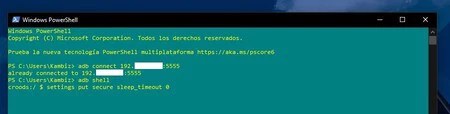
ADB 経由で Fire TV Stick に接続したら、引用符なしで「adb shell」コマンドを使用して ADB シェルにアクセスします。 次に、この別のものを実行してスリープ モードを無効にします。設定 put secure sleep_timeout 0‘。 これにより、デバイスがスリープ状態になりません。 コマンドを実行したら、もう実行する必要はありません。




