
- WhatsApp Plus latest version 2022: why you should always have the APK updated
- How to know if you have the latest version of WhatsApp Plus 2022
WhatsApp it continues to have a series of updates that benefit not only its most recent users, but the entire world. Through the application you can react with any emoji to the various messages that your friends or partner leave you.
But in the last days WhatsApp has been updated to introduce a new way to activate temporary or self-destructing messages. What is the change? Here at MAG we bring you all the news of this function that you will like.
LOOK: WhatsApp Plus latest version 2022: why you should always have the APK updated
HOW TO ACTIVATE THE NEW FUNCTION OF TEMPORARY MESSAGES IN WHATSAPP
- To begin with, you should know that this new version of temporary messages is only found, at the moment, in version 2.22.16.8 of WhatsApp Beta for Android.
- Although when you activate temporary messages in WhatsApp, they tend to disappear completely, that is, there is nothing left.
- But now every time you activate this function, the new chats will disappear, thus leaving the oldest ones to avoid losing any type of data.
- For this you just have to go to WhatsApp.
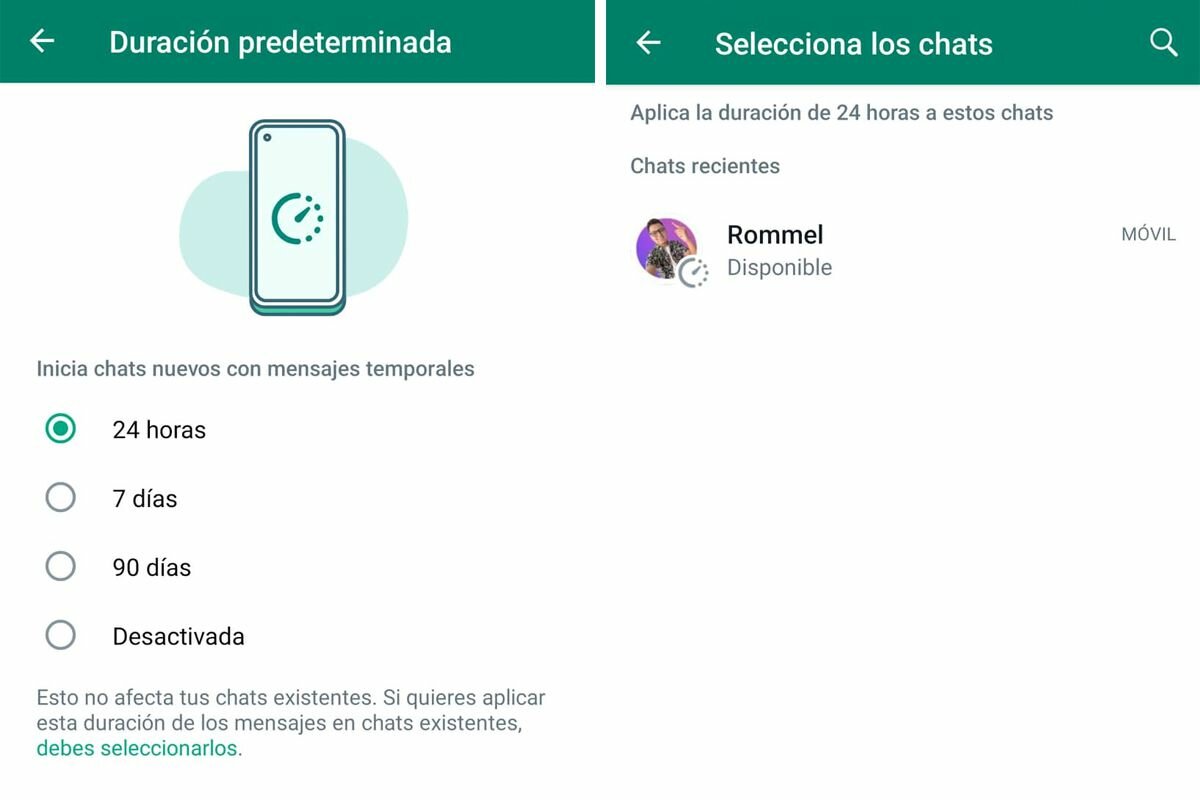
In this way you can select who you want to activate temporary messages on WhatsApp. (Photo: MAG – Rommel Yupanqui)
- Then go to Settings, Privacy and select on “Default Duration”.
- At that moment you will see an option that says “You must select them”.
- Click there and you will see that you can choose which are all your friends who have the “Temporary messages” tool active.
- If you wish, you can deactivate one of them to prevent all past messages from being deleted.
WHY CAN WHATSAPP SUSPEND MY NUMBER OR ACCOUNT?
- unofficial apps: you can say goodbye to your account if WhatsApp detects that you use modified applications, such as: “WhatsApp Plus”, “Fouad WhatsApp”, “GB WhatsApp”, etc.
- Spread phishing and fake promotions: Normally, these types of messages are spread by cybercriminals, who try to send their WhatsApp scams in bulk. The objective is to make you believe that you have won a prize or cash, in order for you to follow a series of steps, among them, installing an application that has a dangerous malware virus that would put your personal information and even bank details at risk.
- Rumors and extortion: If you are one of those people who only shares disinformation that produces chaos, paranoia and even threats, you can also be sanctioned not only temporarily, but forever, of course, as long as users report the message you have sent.
- WhatsApp groups: You should never put the name “Pedophilia” on your conversation, otherwise WhatsApp will block not only you, but also the members of that group.
Follow us on our social networks:


