
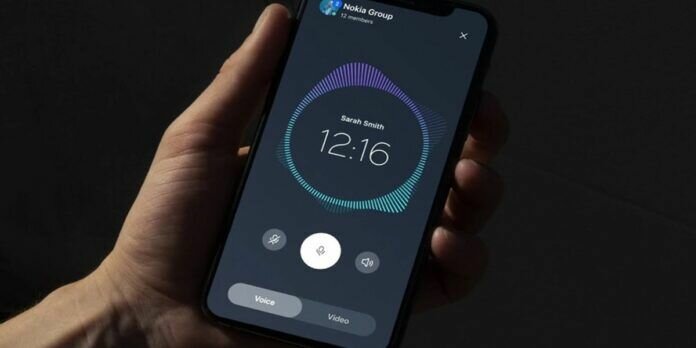
Nokia has released a new user interface called Pure UI for its products, which will be used in mobile phones, Nokia tablets, smartwatches and laptops. This initiative appears to be an effort to strengthen Nokia’s product ecosystem. The new user interface will offer a clean and simple experience, with a large number of features available.
After renewing its logo, Nokia seeks to boost its presence in the market and improve user experience on your products. This new design system aims to create a user interface that is ready for the future. For this, they have used elements and guidelines, which focus on giving users a new minimalist and fresh style.
What is Nokia Pure UI
“Pure UI is a future-proof and flexible design system created by and for Nokia,” says the company. Your goal is provide consistency, flexibility and simplicity on all brand products and platforms, creating a seamless experience for users.
The design system is based on five fundamental principles: pure, simple, humane, bold and open, which reflect the values of the Nokia brand. These principles seek to achieve clarity and simplicity, with intuitive and easy to understand layoutswhich were created with the user’s needs in mind.
Pure UI: all about Nokia’s new user interface
Pure UI carries the minimalist approach of the Nokia brand, which premiered last month. The Nokia Pure design system consists of several elements, including colour, iconography and movement, which determine the overall look.
The system color palette It’s vibrant and bold, consisting of six primary colors: red, blue, green, yellow, pink, and purple. These colors are used to create a sense of harmony and balance in the design system.
The Pure UI iconography it is clean, simple and easy to recognize, which improves the overall user experience. The iconography is designed to be scalable and flexible, adapting to different screen sizes and resolutions.
Regarding the movement, the design adds fluidity and dynamism to the user interface, creating an engaging and enjoyable experience. Movement is used to create a sense of continuity, giving users visual feedback as they interact with the interface.
These are some of the things you will see in Pure UI

An important part of the new look is the nokia pure typography, a simple and modern sans-serif font that is easy to read and legible to be used throughout the user interface. Its new icons are also highlighted, based on fine lines, the thickness of which can be varied to match the display requirements and capabilities of the device.
To achieve a clean user interface, they adopted a thin border design for quick actions like clock, brightness control and others. In addition, they included fluid animations for those components that need to capture the user’s attention.
The interface has been designed to adapt to different screen sizes, offering a consistent experience on any device. It also features unique items and icons that adjust their styles to dark mode.
It only remains to say that Pure UI marks a new excellence in design, providing users with innovative and easy-to-use products and services.
Source | Nokia, Phandroid



