A few days ago, we learned that Vodafone was testing in Germany, together with Deutsche Telekom, a new identification system for advertising, a supercookie capable of tracking all customers to sell that information to advertisers. From the operator they assured us, yes, that they had no plans to implement it in Spain.
Those that have begun to use it in our country are, precisely, its competitors: Movistar and Orange. As Broadband has discovered, the TrustPid token, which identifies users of mobile operators when they browse the internet to show them personalized ads, it is already active in Spain for the clients of both companies.
What is TrustPid and how does it work?
As you probably know, cookies are small files that are used by most websites to identify unique users and store data related to your browsing habits and preferences. Some browsers like Safari, Brave and Firefox already block these types of cookies, while Google Chrome plans to do the same next year.

This has caused some platforms to start betting on so-called supercookies, which are much more difficult to eliminate and block. One of those supercookies is TrustPid, a technical solution for digital advertising created by Vodafone that is already being tested in Germany with clients who have given their consent for it (it assures that it has no plans to bring it to Spain).
TrustPid takes care of track users by assigning a fixed IP to each one to identify your preferences and interests in order to create commercial profiles that operators sell to advertisers. Of course, without revealing details that can identify users. That is, it saves information during web browsing, such as cookies, but stores the data at the mobile Internet service provider (ISP) level.
TrustPid collects data during web browsing and stores it at the mobile Internet service provider (ISP) level.
As we said, cannot be disabled or blocked from web browser settings or by hiding IP addresses. Customers must revoke their consent through a data protection portal enabled for it.
How to check if you have it activated
 Image | Broadband
After reviewing the TrustPid API code, Broadband has found a list of the servers that different telecommunications companies have prepared to provide the identifiers of their clients. This has allowed him to verify which operators are participating in this initiative and the surprise has been that some already have this supercookie activated in various countries.

Specifically, it has located a server registered in the name of “Telefnica Investigacin y Desarrollo” for Movistar customers and another for Orange customers in Spain. Germany’s Deutsche Telekom and France’s SFR also appear on the list, in addition to Vodafone’s domain for German customers.
Officially, only Vodafone Germany and Deutsche Telekom have confirmed conducting a pilot test with TrustPid. From crast.net Mvil, we have contacted Telefnica Spain and Orange Spain, but they have not made any statements in this regard. When we have their answer, we will update the article.
 TrustPid Privacy Policy
What we can confirm is that the TrustPid website itself already mentions Telefnica and Orange, in addition to the Spanish AEPD in your privacy policy. In fact, we have accessed the TrustPid website with the Movistar mobile data network and, by pressing the ‘Verify’ button, it has given us the option to disable the service. The same with an Orange mobile data connection.

What we can confirm is that the TrustPid website itself already mentions Telefnica and Orange, in addition to the Spanish AEPD in your privacy policy. In fact, we have accessed the TrustPid website with the Movistar mobile data network and, by pressing the ‘Verify me’ button, it has given us the option to stop the service. The same with an Orange mobile data connection.
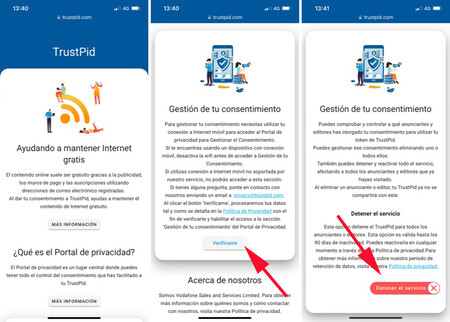
Curiously, if we enter with the mobile network of O2 (Movistar coverage) or Simyo (Orange coverage), in some cases it has allowed us to enter to stop the service, but in most cases it has been stuck “Acceding”. And if we do it with a connection from Yoigo or PepePhone, from Grupo MsMvil, it tells us that “Access has failed” because your mobile connection provider is not yet part of TrustPid.
 Access with Movistar (left) vs access with Pepephone (center) vs access with O2 (right)
So now you know, if you want to know if your operator has the service active, just connect to the mobile network with your phone (not WiFi), enter the TrustPid website and press the Verify me button. We have already told you that in the case of Movistar and Orange, it will not only let you access, but it will also allow you to stop the service.