What you need to know
- Google Forms has added finer customization options for styling the font.
- You will be able to use different typefaces and sizes for different parts of your form.
- Changes will go live for all eligible customers over the next four weeks.
Google’s handy tool for creating online surveys and quizzes will finally get a makeover. The search giant has announced (opens in new tab) a couple of highly requested features for Google Forms, including additional font style and size options.
Starting this week, you’ll be able to modify the look and feel of your forms using different typefaces and sizes. New font styles can be used on different parts of your form. This was not possible in the previous version of Forms.
This means that you can now customize your form’s header, sub-header, and body text individually. Prior to this update, customization options in forms were limited. For example, your chosen theme will apply to the entire form. Plus, you can only choose from four font styles: Basic, Decorative, Formal, and Playful.
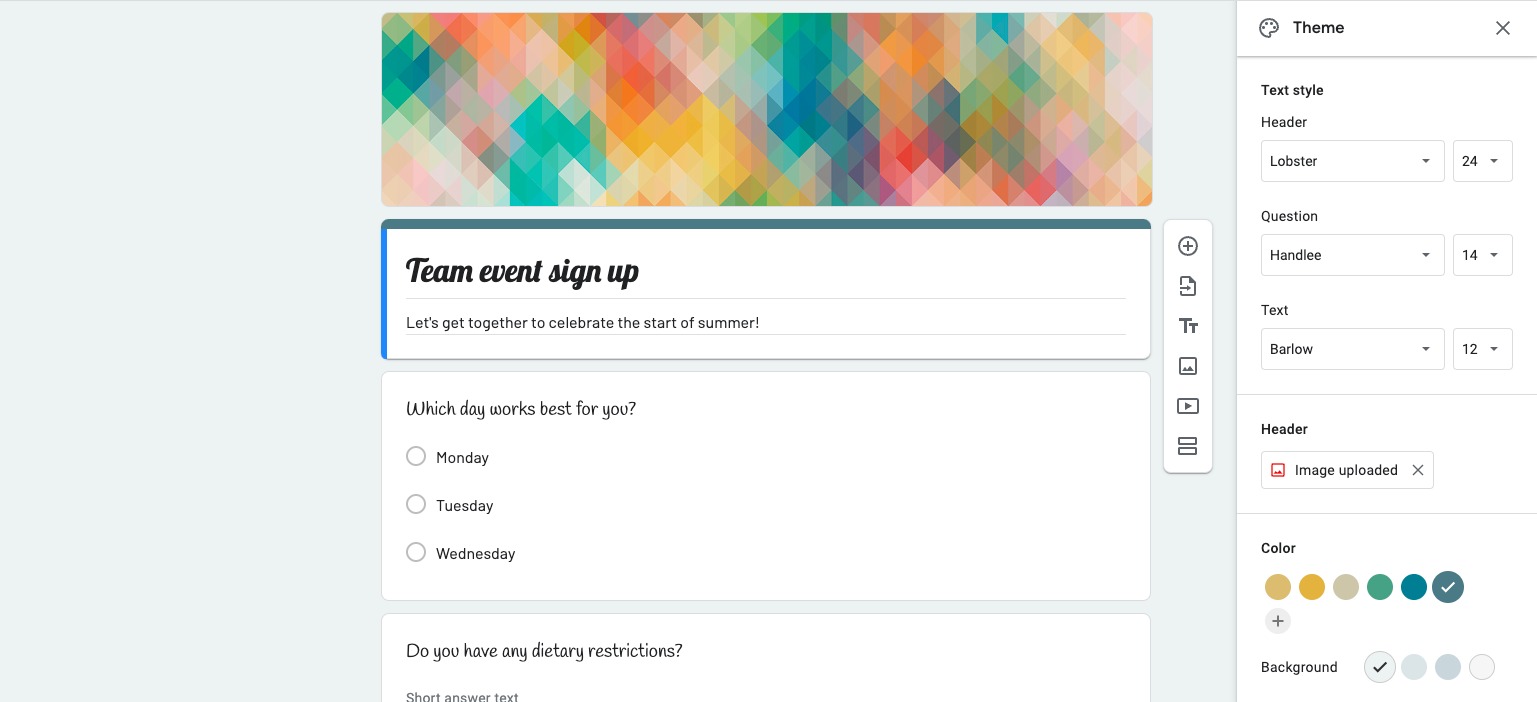
Now, you’ll have more fine-grained control over the look of your form. In the screenshots provided by Google, there are additional typeface options, including Lobster, Handley, Barlow, and others.
Google Forms’ new typeface and size option (Image Credit: Google)
There are buttons for setting the font size of your header and text fields, along with typeface options. As always, you can customize the font color and modify the background.
Google Forms is primarily used for educational purposes and polls, so its latest change should appeal to PC owners and users of the best student Chromebooks.
The update is available to all Google Workspace customers, older G Suite Basic and Business users, and individual Google Account owners. It will take up to four weeks for the latest change to go live for everyone.